SVG + Forms = SVGForm begins
I’m starting to write a ECMAScript-based (JavaScript) SVG UI toolkit called SVGForm. The idea behind it is that it adds HTML-style form controls to ECMAScript applications, allowing you to have some of the functionality of other systems like Adobe Flash and Microsoft Silverlight without needing browser plugins (where the browser has native SVG support). It also has the bonus of the implementations of SVG and ECMAScript exist on many platforms and architectures, where Flash or Silverlight are unavailable or horribly unstable.
As a test so far, I’m upto alpha2 of my UI toolkit. It’s totally unfinished right now, and includes a button and label control, as well as some styling support for them. This allows very simple applications to be created. I haven’t got a focus model done just yet, so text input can’t be done just yet.
Note: Currently, this will not work in Internet Explorer 6 (it does not have SVG support as standard), and other versions of Internet Explorer don’t support parts of the SVG DOM needed to run this library. It does, however, work in Mozilla Firefox 2 and 3, Opera 9.2 and later.
For the first application, I’ve ported a game I developed a very long time ago (2001, if my memory is correct) in Pascal (on DOS) and VB4 (on Windows) to my SVGForm toolkit, called [Clicking Bricks][cba2]. Each of the bricks when pressed toggles one or many other bricks, and the object of the game is to make all the bricks disappear. In the default pattern included, #16545445 (aka “pattern 003”), it takes a minimum of three moves to solve the puzzle. If you want the solution, take a peek in the source file (clickingbricks.js). Unfortunately, I have probably lost the original patterns I made (000-002), so 003 is a new pattern.
In the application there are three files, a small [UI wrapper (SVG)][cba2], the [game logic (JS)][cba2js] and the [SVGForm library (JS)][svgform].
The UI wrapper contains minimal code; references to the game logic and SVGForm library, and some text that is displayed for browsers (or image editors) not capable of running ECMAScript.
The game logic JS is fairly simple too, it creates the game UI, styles it, and contains the game’s logic.
The SVGForm library is heavier, it contains implementations of the SVGButton and SVGLabel classes.
It’s currently all licensed under the [GNU General Public License v2][gpl2], or at your option, any later version published by the Free Software Foundation (this includes GPL3).
To create new patterns, change the query string (the bit of the URL after the question mark) to another number. Each brick has 5 bits (maximum number of 31) representing each of the bricks to be toggled, where bit 1 (1) is brick 1, and bit 5 (16) is brick 5. The various bits are then packed so the most significant bit is brick 1, and the least significant bit is brick 5.
So, for the game #16545445 (the default pattern, 003), the binary code is: 01111 11000 11101 10101 00101, which means:
* Brick 1’s value is 01111, so all but brick 5 is toggled * Brick 2’s value is 11000, so bricks 4 and 5 are toggled * Brick 3’s value is 11101, so all but brick 2 is toggled * Brick 4’s value is 10101, so bricks 1, 3 and 5 are toggled * Brick 5’s value is 00101, so bricks 1 and 3 are toggled
[cba2]: /static/projects/svgform/tests/clickingbricks/clickingbricks.svg?16545445 [cba2js]: /static/projects/svgform/tests/clickingbricks/clickingbricks.js [svgform]: /static/projects/svgform/tests/clickingbricks/svgform.js [gpl2]: http://www.gnu.org/licenses/gpl-2.0.html
It’s Cisco-o-clock!
I thought I’d put up a couple of small new scripts I wrote for my Cisco IP phone.
The first is a simple image converter. It converts images from any format that the [Python Imaging Library (PIL)][pil] supports and turns it into a Cisco IP Phone Image format (CIP) - a Python version of Cisco’s `gif2cip`). For convenience, the new lines in the images are displayed as a colon, so you can use it in other things where you need to chop up the images into parts by line (for example, my clock). If you want to display the image statically, you would remove them. It assumes you’re using 2-bits-per-pixel (4 colour) output for the Cisco 7940/7960, and that your image is an 8-bit greyscale image. If you have an alpha channel or it’s RGB, the image won’t convert.
It uses a very basic algorithm to downsample the image to 2-bits-per-pixel which probably isn’t perfect in the nature of LCDs, so you may need to tweak the colour value curve in your graphics program if you’re using something other than text. It will also automatically invert the image so black on your computer is black on the LCD. You can [grab the script here][image2cisco].
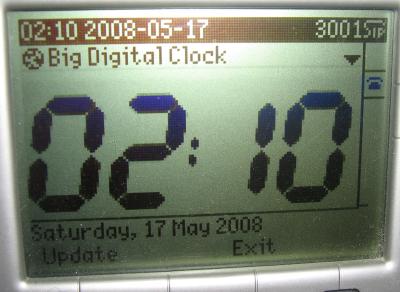
“It’s ten past two on the [rocket clock][playschool]!”
The second program is a big digital clock Python CGI script. It’s based on the same idea as the “Clock” script from the [Cisco IP Phone Services SDK][servicessdk] (which was originally in classic ASP), with a bigger font and the full date displayed at the bottom of the screen. The image for the digits is embedded in the Python script (which is why the file is so big), which you can change by using the image converter program. You can [grab the script here][clock], and [the source PNG images for the digits here][digits] (only needed if you want to modify the digits). Remember to set the execute bit if you’re using plain CGI (you don’t need to do this if you use mod_python).
I always believe you can’t have too many clocks. :P
[pil]: http://www.pythonware.com/products/pil/ [image2cisco]: /static/projects/asterisk/cisco-hax/image2cisco.py [clock]: /static/projects/asterisk/cisco-hax/clock.py [digits]: /static/projects/asterisk/cisco-hax/digits.zip [servicessdk]: http://www.cisco.com/en/US/prod/collateral/voicesw/ps6788/phones/ps379/product_data_sheet09186a00800925a8.html [playschool]: http://en.wikipedia.org/wiki/Play_School_%28Australian_TV_series%29